Install guide
Set up MyFeeds in four steps.
Install the plugin, add the product feed of a shop you're an affiliate for, and pick products for your first post right in the WordPress editor. Most setups take five to ten minutes.
Started a paid trial already? Follow the paid path.
Before you start
Three things to have at hand. No code and no command line anywhere in this guide.
- A WordPress site you can log in toAs an administrator, so you can add plugins.
- WordPress 5.8 or newer, PHP 7.4 or newerAnd the block editor. The Classic Editor is not supported.
- A shop you're an affiliate forThrough an affiliate network, with a product feed. No account yet? In the free plugin you can try it with sample products first.
Step 1 of 4
Install the plugin
Which path is yours?
Free, from WordPress.org
The free version covers one feed, the smart search, the grid layout, and manual plus nightly sync. Install and go.
WordPress 5.8+PHP 7.4+No license key
-
Open your WordPress admin
Log in to your WordPress site. You land on the Dashboard, the main admin page with the sidebar on the left.
-
Go to Plugins, then Add New Plugin
In the sidebar, hover over Plugins and click Add New Plugin. The search bar of the WordPress.org plugin directory sits at the top of the page.
-
Search for MyFeeds, install, activate
Type
MyFeedsinto the search box. The one you want is published by myfeeds and has this violet icon. Click Install Now, then Activate once the installation is done. The MyFeeds icon in the plugin directory.
Rather install from a ZIP? Download the plugin ZIP from the WordPress.org page, then in WordPress choose Plugins, Add New Plugin, Upload Plugin and select the file. Use this if your site can't reach wordpress.org directly.
MyFeeds now sits in your sidebar. On to step 2
Outgrown the free plan later? When one feed isn't enough, or you want the cards to match your brand, or you'd like a full shop on your own site, start a free trial from the plans. Starter and Pro run for 7 days, E-commerce for 14. Then follow the paid path.
A paid plan, after your trial starts
Starter, Pro and E-commerce all use the same plugin, MyFeeds Pro, with the features of your plan switched on. Freemius, who run our checkout, email you the download link the moment your trial is created.
About 2 minutes once the email is inWordPress 5.8+PHP 7.4+
-
Start your trial
Pick a plan in the plans and start its free trial: 7 days for Starter and Pro, 14 for E-commerce. The checkout asks for a card or PayPal to start it. Cancel from your dashboard before the trial ends and you are not charged.
-
Open your email from Freemius
The subject line is "Thank you for your purchase" or "Your MyFeeds plan". Inside is a personal download link for the latest plugin ZIP, and your license key.
Don't see it? Check your spam folder, then sign in to users.freemius.com. Your purchases page has a Download button next to every active license.
-
Download the ZIP
Click the download link. You get a ZIP whose name starts with
myfeedsand carries the version number. Save it where you'll find it again; your Downloads folder is fine. -
Deactivate the free plugin, if you have it
In WordPress go to Plugins, find the free MyFeeds entry (the one that is not called MyFeeds Pro) and click Deactivate. Your feeds, settings and posts stay where they are.
Never both at once. The free plugin and MyFeeds Pro share the same code inside, so activating Pro while the free one still runs stops WordPress with a fatal error and a blank admin screen. Deactivate first, then activate Pro. Leaving the free plugin installed but inactive as a safety net is fine. Pro picks up everything the free plugin saved.
-
Upload the ZIP to WordPress
Still in Plugins, click Add New Plugin at the top, then Upload Plugin. Choose the ZIP, click Install Now, then Activate Plugin. It shows up in your plugin list as MyFeeds Pro.
-
Activate your license
Click MyFeeds in the WordPress sidebar. The first time, Freemius asks for your license key there. Paste the key from the email and click Agree & Activate License. The features of your plan switch on right away.
More than one site? One license activates on one site by default. Upgrade to a multi-site license from your Freemius dashboard, or write to support@myfeeds.site.
MyFeeds Pro is active. On to step 2
Step 2 of 4
Get the product feed link of a shop you're an affiliate for
-
Know what you're looking for
Each shop you're an affiliate for publishes its whole range as one list, with prices and pictures. Your affiliate network gives you a web address for that list: the shop's product feed link. MyFeeds reads it every night, so your cards keep up with the shop.
-
Find it in your network's dashboard
Every network keeps it in a slightly different place. Pick yours for a step-by-step guide:
-
Copy the link
Copy the whole web address. Keep it at hand for step 3.
A link beats a file. MyFeeds can also take a feed file you upload, but a file stays exactly as it was the day you uploaded it. A link is fetched again every night, so prices and stock stay right.
Network not on the list?
We keep developing MyFeeds because we want everyone to be able to connect their feeds. Most other CSV, TSV, XML and JSON feeds already work, and we connect further platforms on request.
Amazon works differently
Amazon has no feed file, so on Pro and up its products come live from Amazon's own Creators API. Amazon opens that access to associates with ten qualified sales in thirty days.
No feed link yet?
In the free plugin, try everything with sample products first. On the empty MyFeeds screen in WordPress, click Load 7 sample products, then carry on with step 4. You can add the real feed whenever you're ready.
You have the link copied. On to step 3
Step 3 of 4
Add the feed in WordPress
-
Open MyFeeds
Click MyFeeds in the WordPress sidebar, then Add your first feed. On a paid plan, later feeds go through + Add Feed.
-
Give the feed a name
One you'll recognise later, for example the shop's name.
-
Paste the link
Under Where is the feed? keep At a URL, paste the link from step 2 into Feed URL and click Create Feed.
-
Let it import
The import runs in the background. A feed with 10,000 products typically takes two to five minutes, and you can keep working meanwhile.
No settings to work out. MyFeeds recognises the format on its own and finds which column is the title, the price, the picture and the link. If a shop names a column in a way MyFeeds has never seen, the mapping editor lets you point it at the right field.
How many feeds? The free plugin holds one shop's feed. Every paid plan holds as many as you like.
The shop's products are in. On to step 4
Step 4 of 4
Publish your first product cards
-
Add the block
Open a post in the WordPress block editor. On a new line, type
/myfeedsand choose MyFeeds – Product Picker.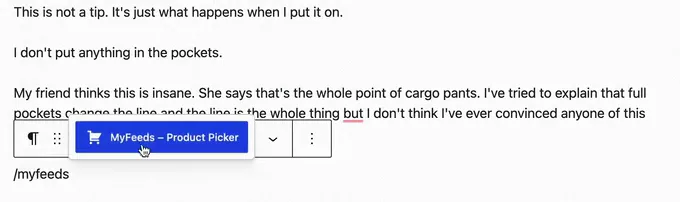
-
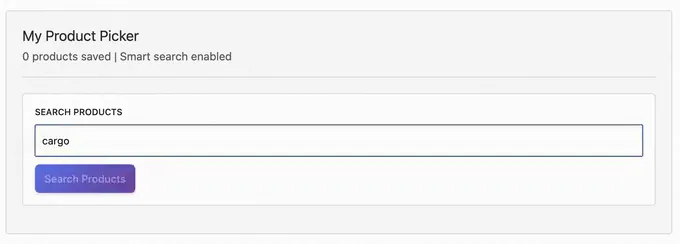
Search the shop's products
Type at least two letters, a product type or a brand for example, and click Search Products.
-
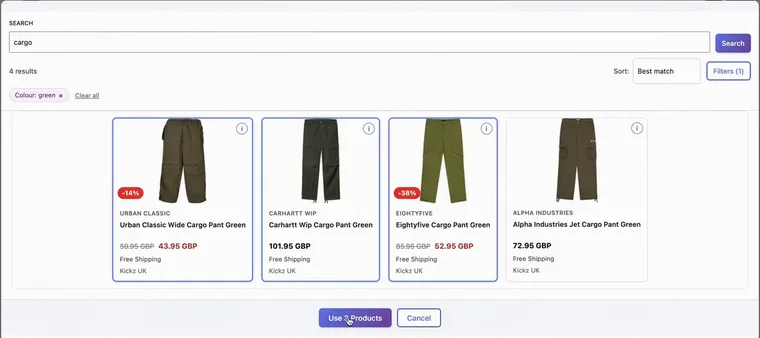
Click the products you want
Filters and sorting help in a big feed. Then click Use 3 Products; the number follows your picks.
-
Publish
Readers see product cards and click through to the shop with your affiliate link. From now on prices refresh every night.
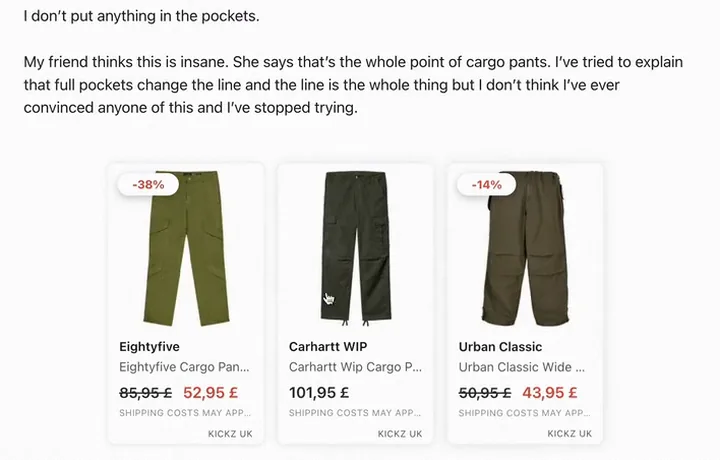
Recorded in the WordPress block editor, on an example post.
Your first product cards are live. That's the whole setup.
If something goes wrong
The snags people run into most, and the fix for each. Still stuck after that? Write to us.
I've never set up a plugin. Do I need technical skills?
No code and no command line. If you can install a WordPress plugin and paste a link, you're set. On a paid plan, the first time you open each MyFeeds screen, a short guided demo walks you through it, so you're never left guessing what a button does.
MyFeeds doesn't show up when I search the plugin directory
FreeYour site may not be able to reach wordpress.org directly. Download the ZIP from the WordPress.org page and upload it under Plugins, Add New Plugin, Upload Plugin.
The email with my download link never arrived
PaidCheck your spam folder first. Then sign in to users.freemius.com: your purchases page has a Download button next to every active license, and your license key.
Blank admin screen or a fatal error right after activating Pro
PaidThe free plugin was still active. The two share the same code inside and can't run together. Deactivate the free MyFeeds first, then activate MyFeeds Pro. Nothing is lost: your feeds, products and posts stay where they are. If WordPress won't let you back into the admin, write to support@myfeeds.site and we'll help.
I can't find my shop's product feed link
Open the guide for your network. You need to be accepted into the shop's affiliate program first; after that the network lists the shop's product feed for you. Network not covered? We connect further platforms on request: support@myfeeds.site.
The import seems to take forever
It runs in the background and depends on the size of the shop's feed. A feed with 10,000 products typically takes two to five minutes. You can keep working, or close the page, while it runs.
Some of the shop's products are missing
MyFeeds needs a product ID in every row of the shop's feed; rows without one are skipped. If products come in but a title, price or picture is empty, the column is usually named in a way MyFeeds does not recognise. The mapping editor lets you point it at the right field.
Prices on my cards don't change
Check whether the feed was added as an uploaded file. A file stays as it was the day you uploaded it. Add the feed again with At a URL and the link from your network, and MyFeeds fetches it every night. You can also sync any feed by hand at any time.
I can't find the Product Picker block
MyFeeds needs the WordPress block editor. With the Classic Editor the block isn't there. In the block editor, type /myfeeds on a new line.
My license won't activate on a second site
PaidOne license activates on one site by default. Upgrade to a multi-site license from your Freemius dashboard, or write to support@myfeeds.site.
Where to get help
Stuck? Write to us.
Tell us your plan, your network and what you see on screen. A screenshot helps.
Your first product cards are four steps away.
Free on WordPress.org for one shop's feed. Paid plans each start with a free trial.
- Cards that match your site: the card design editor, Starter and up.
- What every post and product earns: Pro.
- A shop of your own on your site: E-commerce.