Guides · MyFeeds
Is the free MyFeeds plugin enough?
For one shop, yes. Your posts show that shop's products as cards with picture and price, and the prices are read again every night.
6 minute readFree on WordPress.orgBlock editor only
The short version
In short
- It is free for one shop's product feed. Show as many of that shop's products as you like, in as many posts as you like.
- You pick the products, the plugin keeps them current. With a feed link, price, stock and picture are read again every night.
- You can try it before you have a feed. Seven sample products come with it, and a live preview runs in your browser.
- It stops at one shop and one layout. More shops, a carousel and your own card design start at $9 a month. Click numbers and a shop of your own cost more.
Part 1 of 3
What do you get for free?
Five steps, in the order you meet them.
-
Install it like any other plugin
In WordPress, open Plugins, then Add New Plugin, and search for
MyFeeds. Click Install Now, then Activate. -
Try it with seven sample products
On the empty MyFeeds screen, click Load 7 sample products, then Open a draft with the block ready, and search for
sneaker.The brands and prices are invented, and a sample card links to a page that says so.
-
Connect one shop's product feed
A product feed is a shop's whole range as one list, with prices, pictures and your affiliate links. Your affiliate network gives you a link to it once the shop has accepted you. Our network guides show where.
Click Add your first feed and name it after the shop, because readers see that name on the cards. Paste the link and click Create Feed. Your first real feed replaces the samples.
If you only have a file, upload it instead. Its prices stay as they were that day, until you upload a newer one.
-
Search and pick inside the editor
In a post, type
/myfeedsand choose MyFeeds – Product Picker. Search, narrow the results by brand, colour, category or price, and click the products you want.Each one becomes a card that leads to the product in the shop, through your affiliate link.
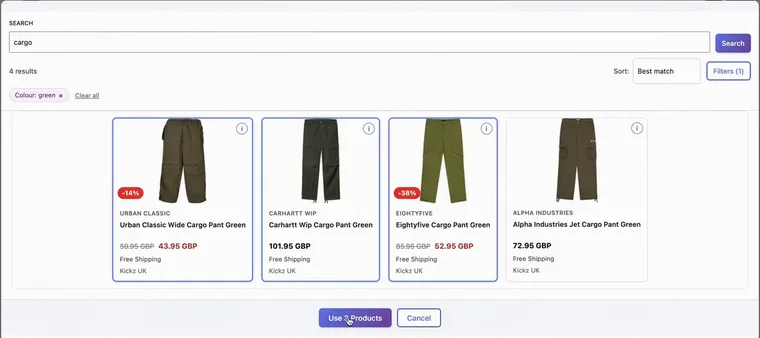
The picker, with three products chosen. Recorded on an example post. -
Your cards keep up with the shop
If the feed came as a link, MyFeeds reads it again every night and updates price, stock, picture and link for the products in your published posts. A sale shows as a struck-through old price and a discount badge.
Once a week it reads the whole feed. That is when new products become searchable, and when a product the shop has dropped disappears from your post. The MyFeeds screen then lists up to ten of the posts it was in.
Two limits: a sold-out product keeps its card in the free plugin, and the schedule is WordPress's own, so on a quiet site a run can be late.
One thing it leaves to you. The links are marked as sponsored for search engines. The sentence that tells your readers you earn a commission is yours to write. Our feed guide says what the US regulator expects.
Part 2 of 3
Where does it stop? At one shop and one layout.
Each paid plan includes everything to its left.
Swipe the table sideways to see the paid plans.
| What you want | Free $0 | Starter $9 a month | Pro $19 a month | E-commerce $49 a month |
|---|---|---|---|---|
| Shops you can show | One | Unlimited | Unlimited | Unlimited |
| A carousel | No | Yes | Yes | Yes |
| Cards in your colours and fonts | No | Yes | Yes | Yes |
| Shop the look: the shops' products on your own photo | No | Yes | Yes | Yes |
| See what gets clicked | No | No | Yes | Yes |
| Jump to posts with a dropped product | No | No | Yes | Yes |
| Amazon links: the name you give and your link | No | Yes | Yes | Yes |
| Amazon with picture and price, see the note | No | No | Yes | Yes |
| A shop page on your site | No | No | No | Yes |
Prices for one site, paid monthly, in USD without VAT.
When the free plugin is enough
When you are an affiliate for one shop, or one shop carries most of what you recommend. The free plugin sets no limit on products or posts, so you can stay for good.
It gets tight once you want products from a second shop.
When you need no plugin at all
For a link or two inside a sentence, copy the link from your network. Cards are for posts that show products.
The note on Amazon. Amazon has no product feed. You add a product by its Amazon link or ASIN and your Associates tag. Its card shows the name you give it, without picture or price. Those two need Amazon's Creators API, open to associates with ten qualifying sales in the past 30 days (as of October 2026). Amazon products appear in your posts, not on the shop page.
The same in every column. MyFeeds works in the WordPress block editor, not in the Classic Editor.
Part 3 of 3
Which one are you?
Find the line that sounds like you.
| If you say | Start with |
|---|---|
| “I recommend products from one shop.” | Free, $0. Everything in part 1, for as long as you like. |
| “I recommend from several shops, or I want the cards to match my site.” | Starter, $9 a month. More shops, a carousel, and cards in your colours and fonts. |
| “I want to know which posts and products my readers click.” | Pro, $19 a month. Clicks counted for every post and product. |
| “I want a shop on my own site that readers can browse.” | E-commerce, $49 a month. A shop page with categories and filters. |
For Shop the look and for Amazon, the table in part 2 names the plan.
If you are between two lines
Start with the lower one. Nothing is lost when you move up later.
Starter and Pro start with a 7-day free trial, E-commerce with 14 days. The checkout asks for a card or PayPal. Cancel before the trial ends and you are not charged.
Questions people ask
Does the free plugin really cost nothing?
Yes. It is $0 on WordPress.org, needs no licence key or account with us, and does not expire. Its menu has three entries with a plan badge: Shop, Design and Analytics. They are pages that describe the paid plans.
What happens to my cards if I upgrade later, or go back?
They stay. The paid plans are a second plugin, MyFeeds Pro, which replaces the free one and takes over its feed, its settings and the cards in your posts. Deactivate the free plugin first: the two cannot run together. If a trial or a plan ends, MyFeeds Pro falls back to the free tier. Feeds, posts and settings stay.
Do I need an affiliate network?
Almost always. The plugin needs a shop's product feed, and shops usually share theirs through an affiliate network. The sample products need no account.
Can I look at it without installing anything?
Yes. On the plugin's page on WordPress.org, click Live Preview. It opens a WordPress site that runs in your browser, with the free plugin and its sample products in a post. You can open the editor and search them. A real shop's feed needs the plugin on your own site.
Sources
- MyFeeds in the WordPress.org plugin directory The Live Preview button, and what the plugin needs to run.
- Cron, WordPress plugin handbook Scheduled tasks are only checked when somebody loads a page.
- Qualify your outbound links to Google, Google Search Central The sponsored mark for paid links.
- Creators API introduction, Amazon Associates The ten qualifying sales in the past 30 days.
Where to go next
Pick your next step.
Try it on one post.
Free on WordPress.org for one shop's feed. Paid plans each start with a free trial.