Guides · Product feeds
How to get a shop's product feed into WordPress.
For bloggers with affiliate links: your affiliate network gives you the product list of a shop you're an affiliate for, as a link or a file. A plugin reads it, and you pick products from it inside WordPress.
12 minute readFor affiliates, not shop ownersSources at the end
The short version
In short
- A product feed is a shop's whole range as one list. One row per product: name, price, picture and your affiliate link.
- You need one when a post shows products. For a link inside a sentence, copy it from your network.
- Take the link when you can get one. A link can be read again later. A file stays as it was on the day you saved it.
Part 1 of 8
Do you need a product feed at all?
Often, no. Here is how to tell before you spend an evening on it.
A shop has accepted you into its affiliate programme, and somewhere in your network's menu you have seen the words “product feed”. It sounds useful. It also sounds like work.
When the post shows products
- A roundup or gift guide with prices. A price typed by hand has to be checked again. A feed carries the shop's current price.
- Many posts, the same few shops. Past a few dozen posts, checking them all by hand stops happening.
When a link will do
- One or two links in a post. Copy the link from your network and paste it.
- You hope it brings new readers. It gives you products to show the readers you have.
Is it worth it for a small site?
AWIN, one of the large networks, says feeds are mainly used by price comparison sites, shopping portals, review sites and deal platforms, but that any publisher may use them. A blog uses a small part of the list, the handful of products it would have linked anyway.
So the size of your site does not decide it. If you recommend six products a year and stand behind each one, a wrong price on any of them costs you a reader's trust.
Part 2 of 8
What is in a product feed?
One row for each product, one column for each thing the shop knows about it.
Think of a very long spreadsheet. Here is one row, turned on its side so it fits your screen.
| Column in this feed | What this row says |
|---|---|
| aw_ | Which product: 31415926 |
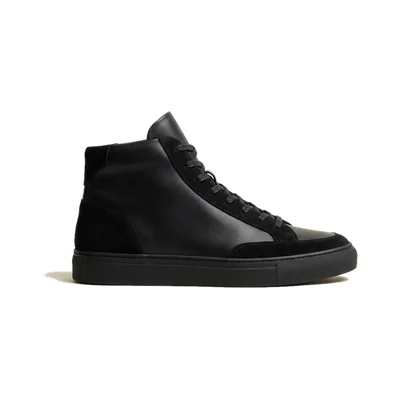
| product_ | Name: Court High-Top Leather Black |
| search_ | Price today: 96.00 |
| product_ | Old price: 129.00 |
| merchant_ | Picture: https://…/court-high-top.jpg |
| aw_ | Your link: https://… to this exact product |
| in_ | In stock: 1 |
| merchant_ | Shop: Kicks Corner |
An invented row with the column names of AWIN's classic format. Example product, sample prices.
What one row teaches you
- Names differ. This feed calls the price
search_price, a feed in Google's shopping format calls itprice. Matching them up is called mapping, and your plugin does it. - One column pays you.
aw_deep_linkis your affiliate link for exactly this product. Its neighbourmerchant_deep_linkis the shop's plain address, which credits nobody.
Part 3 of 8
Where do you find yours?
One worked example, then what the other networks give you.
Look for the part of your account where you choose a shop's product feed and get a download address for it. Networks call it a product feed, a data feed or a product catalog, and they rename their menus.
Two things have to be true first. The shop has accepted you, and it offers a feed at all. Not every shop does.
A worked example: AWIN
As of October 2026 AWIN calls the tool Create-a-Feed. It sits in the Toolbox menu, under Links & Tools.
-
Choose the language first
Create-a-Feed only lists feeds in the language you pick. If a shop seems to be missing, set it to Any.
-
Pick the shop's feed
Most shops have one, called Default. Some have one for each part of their range.
-
Tick the columns
Choose Select All, or at least make sure the tracked link,
aw_deep_link, is among them. -
Copy the address
AWIN calls this a reusable download link. Copy it.
Our AWIN feed guide has every click.
What the other networks hand you
This is what each network's own help describes, as of October 2026.
| What you get | From these networks |
|---|---|
| A link to the feed | AWIN, Partnerize, Webgains, Admitad and Tradedoubler |
| A file you download or are sent | CJ, Impact, Ascend and FlexOffers |
| Files behind a login, or a connection for programs, called an API | Rakuten |
ShareASale is not listed. AWIN announced in March 2025 that it would close the platform by the end of that year and move its shops to AWIN.
Part 4 of 8
A link or a file? Take the link when you can get one.
Both hold the same rows on the day you get them. The difference shows a month later.
A link is a web address your plugin reads the feed from. It often carries a personal key, so treat it like a password. A file is the same list, saved on one day.
The shop lowers a price, and you have a link
- The shoplowers a price.
- Your sitereads the link again.
- Your cardshows the new price.
The shop lowers a price, and you have a file
- The shoplowers a price.
- Your fileis still the one you saved.
- Your cardshows the old price, until you upload a new file.
If your network only sends files
Then the file is your feed, and keeping it fresh is a job you do by hand. Upload a new one whenever prices matter to a post, for example before a sale or once a month.
If that is too much, some plugins get the products through an API instead. Datafeedr and Content Egg in part 5 work that way, for the networks on their lists.
Part 5 of 8
How does it get into WordPress?
Through a plugin. Which kind depends on what you want your readers to see.
An import is not a page yet
In one WordPress support thread, someone imports three products, the plugin confirms they are in its data store, and they cannot work out how to get them onto the site.
The likely explanation is a common one: an import only fills a table in your database. Products appear once a second step puts them in a post or on shop pages. So decide where you want them first.
A feed is not a shop. A shop of your own is a bigger project, with its own guide: how to build an affiliate shop in WordPress.
Three kinds of plugin, by the job they do
Swipe the table sideways to see all three.
| Question | A shop builder | Cards in posts | A general importer |
|---|---|---|---|
| The job | Searches its own product database, drawn from many shops and networks, and turns your picks into WooCommerce products | Puts the products you pick into a post, as cards | Moves any CSV or XML file into posts or WooCommerce products. You decide where every column goes |
| Examples | Datafeedr, with its WooCommerce importer | MyFeeds (our own plugin), Content Egg, AWIN's plugin with its widgets | WP All Import, WP Ultimate CSV Importer |
| Not built for | The feed link your network gave you | A whole shop, unless the plugin has a shop mode. MyFeeds has one on its Shop plan, Content Egg can create WooCommerce products | Affiliate networks in particular |
| Readers can filter and browse | Yes, on WooCommerce's shop pages | Not inside a post | Depends on your theme or shop plugin |
| Watch the cost | Datafeedr needs a paid subscription. Check the price first | MyFeeds is free for one shop's feed. More shops: from $12 a month | WP All Import's scheduling service is $19 a month, as of October 2026 |
Before you build on any plugin, open its page on WordPress.org. Look at when it was last updated and whether support questions get answers.
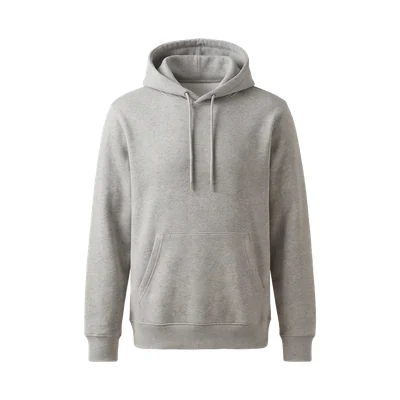
What cards in a post look like
With our own plugin, for example
MyFeeds is the plugin we make. You give it the feed link or the file, then search the shop's products inside the editor and pick.
Its limits, so you can rule it out quickly. It works in the WordPress block editor only. The free plugin holds one shop's feed. It can only keep a feed current if you gave it a link.
Part 6 of 8
How do you use a feed without trouble from Google?
A feed makes it easy to publish a thousand products. Google has a name for sites that do only that.
Google's spam policies call it thin affiliation. They mean pages with affiliate links whose descriptions and reviews are copied from the shop, with nothing of your own added.
The same policies say that taking part in an affiliate programme does not make a site thin. What counts is what you add.
Copied and multiplied
- Descriptions and reviews taken straight from the shop.
- The same content other affiliates of the programme publish too.
- Many pages made from a feed, with little on each of them.
Chosen and explained
- Your own review of the product.
- Testing and ratings.
- Comparisons between products.
- Extra information about the price.
- A way to browse products or categories.
What that means for one post
- Pick a handful. The feed is a list to choose from. Nobody needs a page for every row.
- Say why, in your own words. A short review, with a comparison where it helps.
Even then, nobody can promise how Google rates a single page.
And are you allowed to show all of it?
Mostly yes, with three things to do first.
- Say that you earn a commission. The US Federal Trade Commission wants that close to the recommendation, and says the words “affiliate link” alone, or a “buy now” button, are not enough. Outside the US, check your own regulator.
- Mark your affiliate links as paid. Google prefers
rel="sponsored"and still acceptsrel="nofollow". Links a plugin creates should carry the mark already. - Read the programme terms on pictures and texts. The shop and its network set what you may do with them, and we could not confirm one rule that covers them all.
Part 7 of 8
How do prices stay right after you publish?
A new price reaches your page in four steps.
Shops change prices, sell out and drop products, and a post that was right in March can be wrong by June.
From the shop's price tag to your page
- The shopupdates its feed. How often is its choice.
- The networkpicks up the new version.
- Your sitereads the feed again, if your plugin does that.
- Your pageshows it, once any saved copy of the page is renewed.
The shop and the network
AWIN lets shops refresh a feed up to four times a day or once a week, and recommends at least every 24 hours. In its Create-a-Feed tool, the column Last Update shows when a shop last refreshed its feed. If that is weeks ago, its help sends you to the shop's account manager.
Your site
A link is only read again if your plugin goes back for it on a schedule. AWIN's own WordPress plugin, for one, does not. Its help says files have to be uploaded by hand.
WordPress looks for due tasks only when somebody loads a page, so on a quiet site a nightly job can run late. If that matters, ask your host to run WordPress's scheduled tasks on a timer. Hosts call that a server cron job.
Your page
If a caching plugin or your host saves copies of your pages, visitors see the saved copy until it is renewed. If a price looks old, clear the cache and look again.
Products that disappear
Harder than a new price is a product that leaves the shop for good. The feed stops listing it, and what happens next depends on your plugin.
Every dead link is a commission you earned and never received.
What that costs an old post is its own guide: why affiliate posts stop earning.
How our own plugin does it
Every night, MyFeeds reads a feed link again and updates price, old price, stock, picture and link for the products in your published posts. Once a week it reads each whole feed. That is when new products become searchable and products that have left the feed are noticed.
When a product has left the feed, its card is left out of the post. Until the next weekly run, the card can stay up with its last price. All of this runs on WordPress's own schedule, so on a quiet site it can run late.
You can try this on one post with the free plugin. See the install guide.
Part 8 of 8
What if it breaks?
Four symptoms from public support threads, each with the first thing to try. Not every thread found its cause.
| What you see | What to do |
|---|---|
| “Invalid csv file” | AWIN offers plain CSV and “CSV for Excel”. Try plain CSV with a comma as separator. |
| No pictures or descriptions | Build the feed again with every column ticked. Still empty? Only the shop can supply them. |
| “Premature end of data” | Fetch it again. If it keeps happening, ask the network whether the feed is complete. |
| Stops halfway on a big feed | Import fewer records in each run, or build a smaller feed, for example limited to certain brands. |
The threads behind the rows: the CSV error, missing pictures, the XML error and a very large import.
Start small
One network, one shop, one post. Put three products from a feed into a post you would have written anyway, and look at it again in a month. If the prices still match the shop, add the second shop.
Questions people ask
From WordPress support forums and the networks' own help.
Do I need WooCommerce to show affiliate products?
Not for products inside posts. You need it only if your plugin turns the rows of a feed into WooCommerce products, as some shop builders do.
Does Amazon have a product feed?
No. Amazon does not offer its associates a product feed file. Product data comes through its Creators API, which Amazon opens to associates with ten qualifying sales in the past 30 days (as of October 2026).
And two shorter ones
Can I add my own margin to the prices in a feed?
No. As an affiliate you do not sell anything. The shop sets the price and makes the sale, and you earn a commission on it.
I can download the feed of a shop I never joined. Does a sale still count?
With AWIN, sometimes. For selected shops that accept affiliates automatically, sales made through the feed are credited before you have joined. That does not apply to all shops, so joining properly is the safe way.
Sources (23)
- Product data feeds: troubleshooting and FAQs Awin. Who uses feeds, missing data, the Last Update column, AWIN's own plugin.
- Downloading feeds using Create-a-Feed Awin help centre. Language first, columns, CSV variants.
- How can I access a product feed? Awin. Where the tool sits in the menu.
- FAQs for publishers Awin help centre. An outdated feed, sales before joining.
- Managing your feed Awin help centre. How often shops refresh a feed.
- Your ShareASale future starts on Awin Awin, 10 March 2025. The closing of ShareASale.
- Partners API Partnerize. Search the page for “List all available feeds”.
- Exporting product feeds and feed specifications (for publishers) Webgains. A link to copy, or a file.
- Product feed: what it is and how to export it for your website Admitad. The generated link.
- Making the most of CJ's shopping feed format CJ, 17 April 2018. An export you subscribe to. The current help is behind the login.
- Download product catalogs as a partner impact.com. Three ways to get the file.
- Product catalog overview Rakuten Advertising. Files, after two approvals.
- Where do I locate product feeds? Ascend by Partnerize. The Download Feed button.
- Data feeds: subscriptions FlexOffers. Files after you subscribe.
- Products API for publishers Tradedoubler. The API and its personal key.
- Datafeedr API WordPress.org plugin page. Its product database and the subscription.
- Content Egg WordPress.org plugin page. Posts, price comparison, WooCommerce products.
- Spam policies for Google web search Google, last updated 28 August 2026. Thin affiliation and scaled content abuse.
- Qualify your outbound links to Google Google. How to mark paid links.
- FTC's Endorsement Guides: what people are asking US Federal Trade Commission. Disclosing affiliate links.
- Cron WordPress plugin handbook. When scheduled tasks run.
- Schedule WordPress imports WP All Import. The price, as shown in October 2026.
- Creators API, introduction Amazon Associates. The ten qualifying sales.
Where to go next
Pick your next step.
Start with one shop and one post.
Free on WordPress.org for one shop's feed. Paid plans each start with a free trial.
Want to see the plans first? Compare the plans.